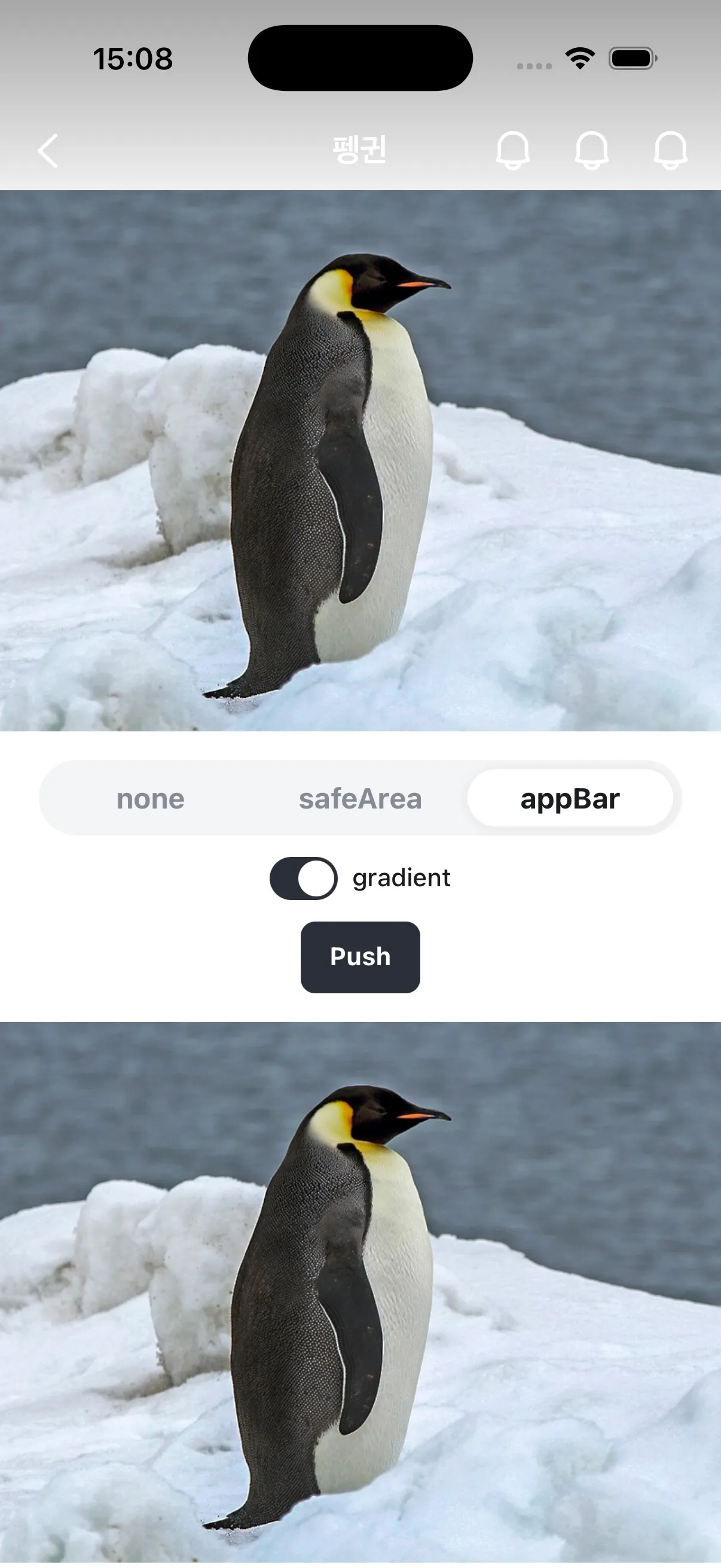
Stackflow 네비게이션에서 개별 화면을 구성하는 컴포넌트입니다. 모바일 앱과 같은 화면 전환 경험을 제공할 때 사용됩니다.
import { IconBellFill } from "@karrotmarket/react-monochrome-icon" ; import { Flex } from "@seed-design/react" ; import type { StaticActivityComponentType } from "@stackflow/react/future" ; import { AppBar, AppBarCloseButton, AppBarIconButton, AppBarLeft, AppBarMain, AppBarRight, } from "seed-design/ui/app-bar" ; import { AppScreen, AppScreenContent } from "seed-design/ui/app-screen" ; declare module "@stackflow/config" { interface Register { ActivityAppScreenPreview : {}; } } const ActivityAppScreenPreview : StaticActivityComponentType < "ActivityAppScreenPreview" > = () => { return ( < AppScreen theme = "cupertino" > < AppBar > < AppBarLeft > < AppBarCloseButton /> </ AppBarLeft > < AppBarMain >Preview</ AppBarMain > < AppBarRight > < AppBarIconButton aria-label = "Notification" > < IconBellFill /> </ AppBarIconButton > </ AppBarRight > </ AppBar > < AppScreenContent > < Flex height = "full" justify = "center" align = "center" > Preview </ Flex > </ AppScreenContent > </ AppScreen > ); }; export default ActivityAppScreenPreview;
npx @seed-design/cli@latest add ui:app-screen pnpm dlx @seed-design/cli@latest add ui:app-screen yarn dlx @seed-design/cli@latest add ui:app-screen bun x @seed-design/cli@latest add ui:app-screen 의존성 설치
npm install @karrotmarket/react-monochrome-icon @seed-design/react @seed-design/stackflow @stackflow/react yarn add @karrotmarket/react-monochrome-icon @seed-design/react @seed-design/stackflow @stackflow/react pnpm add @karrotmarket/react-monochrome-icon @seed-design/react @seed-design/stackflow @stackflow/react bun add @karrotmarket/react-monochrome-icon @seed-design/react @seed-design/stackflow @stackflow/react 아래 코드를 복사 후 붙여넣고 사용하세요 /** * @file ui:app-screen * @requires @seed-design/react@^2.0.0 || ^3.0.0 **/ "use client" ; import { PullToRefreshRoot, PullToRefreshContent, PullToRefreshIndicator } from "./pull-to-refresh" ; import { AppScreen as SeedAppScreen } from "@seed-design/stackflow" ; import { useActions, useActivity } from "@stackflow/react" ; import { forwardRef } from "react" ; export interface AppScreenProps extends Omit < SeedAppScreen . RootProps , "asChild" > { preventSwipeBack ?: boolean ; } export const AppScreen = forwardRef < HTMLDivElement , AppScreenProps >( ({ children , onSwipeBackEnd , preventSwipeBack , ... otherProps }, ref ) => { const { pop } = useActions (); const { isRoot } = useActivity (); const shouldSwipeBack = ! isRoot && ! preventSwipeBack; return ( < SeedAppScreen.Root ref = {ref} onSwipeBackEnd = {({ swiped }) => { if (swiped) { pop (); } onSwipeBackEnd ?.({ swiped }); }} { ... otherProps} > < SeedAppScreen.Dim /> {children} {shouldSwipeBack && < SeedAppScreen.Edge />} </ SeedAppScreen.Root > ); }, ); AppScreen.displayName = "AppScreen" ; export interface AppScreenContentProps extends Omit < SeedAppScreen . LayerProps , "asChild" > { ptr ?: boolean ; onPtrReady ?: () => void ; onPtrRefresh ?: () => Promise < void >; } export const AppScreenContent = forwardRef < HTMLDivElement , AppScreenContentProps >( ({ children , ptr , onPtrReady , onPtrRefresh , ... otherProps }, ref ) => { if ( ! ptr) { return ( < SeedAppScreen.Layer ref = {ref} { ... otherProps}> {children} </ SeedAppScreen.Layer > ); } return ( < PullToRefreshRoot asChild onPtrReady = {onPtrReady} onPtrRefresh = {onPtrRefresh}> < SeedAppScreen.Layer ref = {ref} { ... otherProps}> < PullToRefreshIndicator /> < PullToRefreshContent asChild >{children}</ PullToRefreshContent > </ SeedAppScreen.Layer > </ PullToRefreshRoot > ); }, ); /** * This file is a snippet from SEED Design, helping you get started quickly with @seed-design/* packages. * You can extend this snippet however you want. */ /** * @file ui:app-screen * @requires @seed-design/react@^2.0.0 || ^3.0.0 **/ "use client" ; import { IconChevronLeftLine, IconXmarkLine } from "@karrotmarket/react-monochrome-icon" ; // "@daangn/react-monochrome-icon"과 동일합니다. import { VStack } from "@seed-design/react" ; import { AppBar as SeedAppBar } from "@seed-design/stackflow" ; import { useActions, useActivity } from "@stackflow/react" ; import * as React from "react" ; import { forwardRef } from "react" ; export interface AppBarProps extends SeedAppBar . RootProps {} export const AppBar = SeedAppBar.Root; export interface AppBarLeftProps extends SeedAppBar . LeftProps {} export const AppBarLeft = SeedAppBar.Left; export interface AppBarRightProps extends SeedAppBar . RightProps {} export const AppBarRight = SeedAppBar.Right; export interface AppBarSlotProps extends SeedAppBar . SlotProps {} export const AppBarSlot = SeedAppBar.Slot; export interface AppBarMainProps extends Omit < SeedAppBar . MainProps , "asChild" > { /** * The title of the app bar. * If children is provided as ReactElement, this prop will be ignored. */ title ?: string ; /** * The subtitle of the app bar. * If children is provided as ReactElement, this prop will be ignored. */ subtitle ?: string ; } export const AppBarMain = forwardRef < HTMLDivElement , AppBarMainProps >( ({ title , subtitle , children , ... otherProps }, ref ) => { if (React. isValidElement (children)) { return ( < SeedAppBar.Main { ... otherProps} ref = {ref}> {children} </ SeedAppBar.Main > ); } return ( < SeedAppBar.Main layout = {subtitle ? "withSubtitle" : "titleOnly" } { ... otherProps} ref = {ref}> < VStack overflowX = "auto" > < SeedAppBar.Title >{children ?? title}</ SeedAppBar.Title > {subtitle ? < SeedAppBar.Subtitle >{subtitle}</ SeedAppBar.Subtitle > : null } </ VStack > </ SeedAppBar.Main > ); }, ); AppBarMain.displayName = "AppBarMain" ; export interface AppBarIconButtonProps extends SeedAppBar . IconButtonProps {} export const AppBarIconButton = SeedAppBar.IconButton; export const AppBarBackButton = forwardRef < HTMLButtonElement , AppBarIconButtonProps >( ({ children = < IconChevronLeftLine />, onClick , ... otherProps }, ref ) => { const activity = useActivity (); const actions = useActions (); const handleOnClick = ( e : React . MouseEvent < HTMLButtonElement >) => { onClick ?.(e); if ( ! e.defaultPrevented) { actions. pop (); } }; if ( ! activity) { return null ; } if (activity.isRoot) { return null ; } return ( < SeedAppBar.IconButton ref = {ref} aria-label = "뒤로" type = "button" onClick = {handleOnClick} { ... otherProps} > {children} </ SeedAppBar.IconButton > ); }, ); AppBarBackButton.displayName = "AppBarBackButton" ; export const AppBarCloseButton = forwardRef < HTMLButtonElement , AppBarIconButtonProps >( ({ children = < IconXmarkLine />, onClick , ... otherProps }, ref ) => { const activity = useActivity (); const handleOnClick = ( e : React . MouseEvent < HTMLButtonElement >) => { onClick ?.(e); if ( ! e.defaultPrevented) { // you can do something here } }; const isRoot = ! activity || activity.isRoot; if ( ! isRoot) { return null ; } return ( < AppBarIconButton ref = {ref} aria-label = "닫기" type = "button" onClick = {handleOnClick} { ... otherProps} > {children} </ AppBarIconButton > ); }, ); AppBarCloseButton.displayName = "AppBarCloseButton" ; /** * This file is a snippet from SEED Design, helping you get started quickly with @seed-design/* packages. * You can extend this snippet however you want. */ import { AppBar, AppBarBackButton, AppBarCloseButton, AppBarIconButton, AppBarLeft, AppBarMain, AppBarRight, } from "seed-design/ui/app-bar" ; import { AppScreen, AppScreenContent } from "seed-design/ui/app-screen" ; < AppScreen theme = "cupertino" > < AppBar > < AppBarLeft > < AppBarBackButton /> </ AppBarLeft > < AppBarMain >Title</ AppBarMain > < AppBarRight >{ /* actions */ }</ AppBarRight > </ AppBar > < AppScreenContent >{ /* content */ }</ AppScreenContent > </ AppScreen > preventSwipeBack?boolean | undefined
onSwipeBackStart?(() => void ) | undefined
onSwipeBackMove?(( props : { displacement : number ; displacementRatio : number ; }) => void ) | undefined
onSwipeBackEnd?(( props : { swiped : boolean ; }) => void ) | undefined
ptr?boolean | undefined
onPtrReady?(() => void ) | undefined
onPtrRefresh?(() => Promise <void> ) | undefined
background?(string & {}) | ScopedColorBg | ScopedColorPalette | ScopedColorBanner | undefined
subtitle?string | undefined
theme?"cupertino" | "android" | undefined
transitionStyle?"slideFromRightIOS" | "fadeFromBottomAndroid" | "fadeIn" | undefined
tone?"layer" | "transparent" | undefined
layout?"titleOnly" | "withSubtitle" | undefined
AppScreen의 tone 속성을 transparent로 설정하여 투명한 배경을 사용할 수 있습니다.
AppBar의 배경이 투명해집니다.모바일 OS 상태바를 포함한 AppScreen 상단에 그라디언트가 표시됩니다.
gradient 속성을 false로 설정하여 숨길 수 있습니다.
import { IconBellFill } from "@karrotmarket/react-monochrome-icon" ; import { Flex } from "@seed-design/react" ; import type { StaticActivityComponentType } from "@stackflow/react/future" ; import { AppBar, AppBarCloseButton, AppBarIconButton, AppBarLeft, AppBarMain, AppBarRight, } from "seed-design/ui/app-bar" ; import { AppScreen, AppScreenContent } from "seed-design/ui/app-screen" ; declare module "@stackflow/config" { interface Register { ActivityAppScreenTransparent : {}; } } const ActivityAppScreenTransparent : StaticActivityComponentType < "ActivityAppScreenTransparent" > = () => { return ( < AppScreen theme = "cupertino" layerOffsetTop = "none" tone = "transparent" > < AppBar > < AppBarLeft > < AppBarCloseButton aria-label = "Close" /> </ AppBarLeft > < AppBarMain >Preview</ AppBarMain > < AppBarRight > < AppBarIconButton aria-label = "Notification" > < IconBellFill /> </ AppBarIconButton > </ AppBarRight > </ AppBar > < AppScreenContent > < Flex height = "full" justify = "center" align = "center" bg = "palette.gray800" color = "fg.onNeutralSolid" > Preview </ Flex > </ AppScreenContent > </ AppScreen > ); }; export default ActivityAppScreenTransparent; Intersection Observer를 사용해 AppBar의 tone 속성을 동적으로 변경할 수 있습니다.
import { IconBellFill } from "@karrotmarket/react-monochrome-icon" ; import { Flex } from "@seed-design/react" ; import type { StaticActivityComponentType } from "@stackflow/react/future" ; import { useEffect, useRef, useState } from "react" ; import { AppBar, AppBarCloseButton, AppBarIconButton, AppBarLeft, AppBarMain, type AppBarProps, AppBarRight, } from "seed-design/ui/app-bar" ; import { AppScreen, AppScreenContent } from "seed-design/ui/app-screen" ; declare module "@stackflow/config" { interface Register { ActivityAppScreenIntersectionObserver : {}; } } const ActivityAppScreenIntersectionObserver : StaticActivityComponentType < "ActivityAppScreenIntersectionObserver" > = () => { const [ tone , setTone ] = useState < AppBarProps [ "tone" ]>( "transparent" ); const whiteImageRef = useRef < HTMLDivElement >( null ); useEffect (() => { const observer = new IntersectionObserver ( ( entries ) => { const entry = entries[ 0 ]; if ( ! entry.isIntersecting) { // 이미지 영역을 벗어나면 tone을 layer로 변경 setTone ( "layer" ); } else { // 이미지 영역을 포함하면 tone을 transparent로 변경 setTone ( "transparent" ); } }, { threshold: [ 0 , 0.1 , 0.5 , 1 ], rootMargin: "0px" , }, ); if (whiteImageRef.current) { observer. observe (whiteImageRef.current); } return () => { observer. disconnect (); }; }, []); return ( < AppScreen theme = "cupertino" layerOffsetTop = "none" tone = {tone}> < AppBar > < AppBarLeft > < AppBarCloseButton aria-label = "Close" /> </ AppBarLeft > < AppBarMain >Preview</ AppBarMain > < AppBarRight > < AppBarIconButton aria-label = "Notification" > < IconBellFill /> </ AppBarIconButton > </ AppBarRight > </ AppBar > < AppScreenContent > < Flex ref = {whiteImageRef} justifyContent = "center" alignItems = "center" bg = "palette.staticWhite" height = "400px" width = "full" > 하얀 이미지 </ Flex > < Flex height = "1000px" justify = "center" align = "center" bg = "palette.gray800" color = "fg.onNeutralSolid" > 컨텐츠 영역 </ Flex > </ AppScreenContent > </ AppScreen > ); }; export default ActivityAppScreenIntersectionObserver; layerOffsetTop 속성을 사용해 AppScreenContent의 상단 오프셋을 조정할 수 있습니다.
tone="transparent"와 gradient를 사용하는 경우, 일반적으로 layerOffsetTop="none"을 함께 설정하여 모바일 OS 상태바 영역까지 콘텐츠 영역을 확장합니다.
safe area 처리에 필요한 viewport 설정은 Safe Area 구현 가이드 를 참고하세요.
AppScreen은 기기의 safe area inset을 반영합니다.
상단과 하단 inset은 layerOffsetTop, layerOffsetBottom 속성으로 조정합니다.
좌우 inset은 항상 반영됩니다. AppBar와 AppScreenContent의 내용이 좌우 inset만큼 안쪽으로 들어가므로, 가로 모드처럼 좌우 inset이 있는 화면에서도 디스플레이 컷아웃에 가려지지 않습니다.
좌우 inset이 반영되므로 AppScreenContent 안의 요소는 화면 끝까지 닿지 않습니다. 이미지, 가로 스크롤 영역, 배경처럼 화면 끝까지 채워야 하는 요소는 inset만큼 다시 넓혀야 합니다. 구현 방법은 Safe Area 구현 가이드 를 참고하세요.
요소를 safe area 안에 둘지, 화면 끝까지 채울지 정하는 기준은 Safe Area 패턴 을 참고하세요.
tone="layer"인 경우 AppBar의 색상을 변경할 수 있습니다.
AppBarIconButton 내에 Icon 컴포넌트를 사용하여 아이콘을 커스터마이징할 수 있습니다.
import { Flex, Icon } from "@seed-design/react" ; import { IconBellFill } from "@karrotmarket/react-monochrome-icon" ; import type { StaticActivityComponentType } from "@stackflow/react/future" ; import { AppBar, AppBarIconButton, AppBarMain, AppBarRight } from "seed-design/ui/app-bar" ; import { AppScreen, AppScreenContent } from "seed-design/ui/app-screen" ; declare module "@stackflow/config" { interface Register { ActivityAppScreenAppBarCustomization : {}; } } const ActivityAppScreenAppBarCustomization : StaticActivityComponentType < "ActivityAppScreenAppBarCustomization" > = () => { return ( < AppScreen theme = "android" > < AppBar bg = "palette.blue200" > < AppBarMain title = "Preview" subtitle = "This is a nice preview." /> < AppBarRight > < AppBarIconButton aria-label = "Notification" > < Icon svg = {< IconBellFill />} color = "palette.blue500" size = "x5" /> </ AppBarIconButton > </ AppBarRight > </ AppBar > < AppScreenContent > < Flex justify = "center" align = "center" height = "full" > Preview </ Flex > </ AppScreenContent > </ AppScreen > ); }; export default ActivityAppScreenAppBarCustomization; AppBar 내에 AppBarLeft, AppBarMain, AppBarRight에 대응되지 않는 커스텀 요소를 배치하는 경우, 다른 요소와 동일한 화면 전환 트랜지션을 적용하기 위해 AppBarSlot 컴포넌트를 사용합니다.
AppBarSlot은 하위 요소에 class를 주입하여 트랜지션을 적용하며, 추가 마크업은 생성하지 않습니다.
import { useActivity, useFlow, type StaticActivityComponentType } from "@stackflow/react/future" ; import { AppBar, AppBarBackButton, AppBarLeft, AppBarRight, AppBarIconButton, AppBarSlot, } from "seed-design/ui/app-bar" ; import { AppScreen, AppScreenContent } from "seed-design/ui/app-screen" ; import { IconBellLine } from "@karrotmarket/react-monochrome-icon" ; import { Flex, Text, VStack } from "@seed-design/react" ; import { ActionButton } from "seed-design/ui/action-button" ; declare module "@stackflow/config" { interface Register { ActivityAppBarSlot : Record < string , never >; } } function FakeSearchBar ( props : React . HTMLAttributes < HTMLDivElement >) { return ( < Flex grow py = "x2" px = "x2_5" height = "full" style = {{ boxSizing: "border-box" }} { ... props}> < Flex px = "x3" background = "bg.neutralWeak" grow borderRadius = "r2" align = "center" borderColor = "stroke.neutralMuted" borderWidth = { 1 } > < Text color = "fg.placeholder" textStyle = "t4Medium" > 검색어를 입력하세요 </ Text > </ Flex > </ Flex > ); } const ActivityAppBarSlot : StaticActivityComponentType < "ActivityAppBarSlot" > = () => { const { isRoot } = useActivity (); const { push } = useFlow (); return ( < AppScreen theme = "cupertino" > < AppBar > { ! isRoot && ( < AppBarLeft > < AppBarBackButton /> </ AppBarLeft > )} < AppBarSlot > < FakeSearchBar /> </ AppBarSlot > < AppBarRight > < AppBarIconButton aria-label = "알림" > < IconBellLine /> </ AppBarIconButton > < AppBarIconButton aria-label = "알림" > < IconBellLine /> </ AppBarIconButton > </ AppBarRight > </ AppBar > < AppScreenContent > < VStack gap = "spacingY.componentDefault" px = "spacingX.globalGutter" py = "x4" > < Text as = "p" textStyle = "articleBody" color = "fg.neutral" > AppBar.Slot은 커스텀 요소에 stackflow 트랜지션 애니메이션을 적용합니다. 이 페이지에서 뒤로 swipe하면 검색바가 IconButton과 동일하게 fade 트랜지션됩니다. </ Text > < ActionButton onClick = {() => push ( "ActivityAppBarSlot" , {})} variant = "neutralSolid" > 이 액티비티 다시 열기 </ ActionButton > </ VStack > </ AppScreenContent > </ AppScreen > ); }; export default ActivityAppBarSlot; preventSwipeBack 속성을 사용해 theme="cupertino"인 AppScreen에서 edge 영역을 렌더링하지 않음으로써 스와이프 백 제스처를 방지할 수 있습니다.
transitionStyle 속성을 사용해 AppScreen이 최상위로 push되거나 최상위에서 pop될 때 재생할 트랜지션을 지정할 수 있습니다.
별도로 지정하지 않는 경우, transitionStyle은 theme에 따른 기본값을 갖습니다.
theme="cupertino": slideFromRightIOStheme="android": fadeFromBottomAndroid
최상위 AppScreen이 push/pop될 때, 최상위가 아닌 AppScreen도 함께 트랜지션을 재생합니다.
최상위가 아닌 AppScreen의 트랜지션 스타일 @seed-design/[email protected] 까지
최상위 AppScreen이 push/pop될 때, 최상위가 아닌 AppScreen은 각 AppScreen의 고유한 transitionStyle을 재생합니다.
예를 들면, transitionStyle="fadeFromBottomAndroid"인 0번 AppScreen 위에 transitionStyle="slideFromLeftIOS"인 1번 AppScreen이 push되는 경우, 0번 AppScreen은 fadeFromBottomAndroid 트랜지션을 재생합니다.
0번 AppScreen이 위치 변화 없이 그대로 유지된 상태에서(fadeFromBottomAndroid) 1번 AppScreen이 우측에서 슬라이드 인(slideFromLeftIOS)
이후 버전
최상위 AppScreen이 push/pop될 때, 최상위가 아닌 AppScreen은 최상위 AppScreen의 transitionStyle을 재생합니다.
같은 스택 내에 여러 transitionStyle이 공존할 때 자연스러운 트랜지션을 제공합니다.
예를 들면, transitionStyle="fadeFromBottomAndroid"인 0번 AppScreen 위에 transitionStyle="slideFromLeftIOS"인 1번 AppScreen이 push되는 경우, 0번 AppScreen은 slideFromLeftIOS 트랜지션을 재생합니다.
0번 AppScreen이 자연스럽게 좌측으로 조금 밀려나며 어두워지고(slideFromLeftIOS) 1번 AppScreen이 우측에서 슬라이드 인(slideFromLeftIOS)
ActivityTransitionStyle.tsx
import { VStack, Text } from "@seed-design/react" ; import { useFlow, type StaticActivityComponentType } from "@stackflow/react/future" ; import { AppBar, AppBarBackButton, AppBarIconButton, AppBarLeft, AppBarMain, AppBarRight, } from "seed-design/ui/app-bar" ; import { AppScreen, AppScreenContent, type AppScreenProps } from "seed-design/ui/app-screen" ; import { IconHouseLine } from "@karrotmarket/react-monochrome-icon" ; import { ActionButton } from "seed-design/ui/action-button" ; import { appScreenVariantMap } from "@seed-design/css/recipes/app-screen" ; import { Snackbar, useSnackbarAdapter } from "seed-design/ui/snackbar" ; import { SegmentedControl, SegmentedControlItem } from "seed-design/ui/segmented-control" ; import { useState } from "react" ; declare module "@stackflow/config" { interface Register { ActivityTransitionStyle : { transitionStyle : NonNullable < AppScreenProps [ "transitionStyle" ]>; }; } } const ActivityTransitionStyle : StaticActivityComponentType < "ActivityTransitionStyle" > = ({ params: { transitionStyle }, }) => { const { push } = useFlow (); const { create } = useSnackbarAdapter (); const [ preventSwipeBack , setPreventSwipeBack ] = useState ( false ); return ( < AppScreen transitionStyle = {transitionStyle} preventSwipeBack = {preventSwipeBack} onSwipeBackStart = {() => { create ({ render : () => < Snackbar message = "Started swiping" />, timeout: 500 }); }} onSwipeBackEnd = {({ swiped }) => { create ({ render : () => < Snackbar message = { `Swiped: ${ swiped }` } />, timeout: 500 }); }} > < AppBar > < AppBarLeft > < AppBarBackButton /> </ AppBarLeft > { /* can be undefined if search parameter isn't provided */ } < AppBarMain title = {transitionStyle ?? "Transition Styles" } /> < AppBarRight > < AppBarIconButton aria-label = "Home" onClick = {() => push ( "ActivityHome" , {})}> < IconHouseLine /> </ AppBarIconButton > </ AppBarRight > </ AppBar > < AppScreenContent > < VStack px = "spacingX.globalGutter" py = "x3" gap = "x4" > < VStack gap = "x2" > {appScreenVariantMap.transitionStyle. map (( style ) => ( < ActionButton key = {style} variant = {transitionStyle === style ? "neutralWeak" : "neutralSolid" } onClick = {() => push ( "ActivityTransitionStyle" , { transitionStyle: style })} > {style} </ ActionButton > ))} </ VStack > < VStack gap = "x2" align = "center" > < Text textStyle = "t3Bold" aria-hidden > Prevent Swipe Back </ Text > < SegmentedControl value = {preventSwipeBack ? "true" : "false" } onValueChange = {( value ) => setPreventSwipeBack (value === "true" )} aria-label = "Prevent Swipe Back" > < SegmentedControlItem value = "false" >false</ SegmentedControlItem > < SegmentedControlItem value = "true" >true</ SegmentedControlItem > </ SegmentedControl > </ VStack > </ VStack > </ AppScreenContent > </ AppScreen > ); }; export default ActivityTransitionStyle;